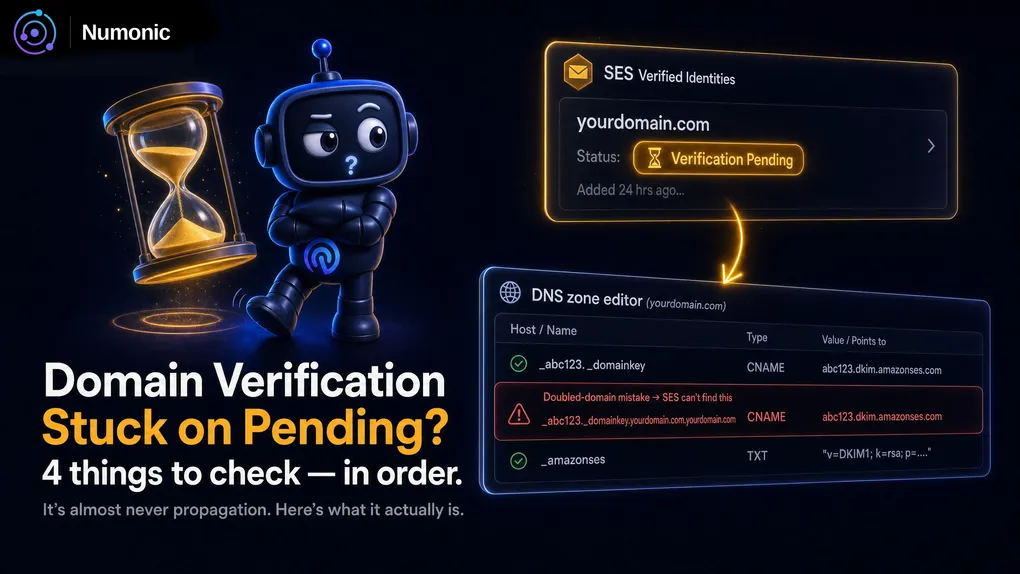
Amazon SES Domain Verification Stuck on Pending: How to Fix It
 By Brian Havelka · · 3 min read
 You added the DNS records SES asked for.
SES still says Verification pending.
Hours pass. Maybe a day. Nothing changes.
Here’s the reassuring part: “pending” almost never means “wait longer.” It means SES can’t see your records yet — and there are only four reasons for that. Check them in order.
Check 1: Are the Records Actually Public?
SES verifies your domain by looking up the CNAME records it gave you — from the public internet.
If those records aren’t publicly visible, SES can’t see them, and neither can anyone else.
How to check it
Run your domain through a checker that scans SPF, DKIM, DMARC, and MX and tells you in seconds what’s live and what’s missing.
For the exact record SES is waiting on, query that specific name directly:
dig CNAME abc123._domainkey.yourdomain.comEither way, the rule is simple: if you can’t see it from the outside, neither can Amazon. If the lookup comes back empty, the record isn’t really published — the problem is upstream, in your DNS.
Check 2: The Doubled-Domain Mistake
This is the most common cause, by far.
Some DNS hosts automatically append your domain name to every record you enter. So when you paste in the full name SES gave you:
abc123._domainkey.yourdomain.comyour DNS host quietly turns it into:
abc123._domainkey.yourdomain.com.yourdomain.comThe record exists — it’s just at the wrong name, so SES never finds it.
How to fix it
Open your zone editor and look closely at the actual record names.
If your host auto-appends the domain, enter only the host part — abc123._domainkey — and let it add .yourdomain.com for you.
Check 3: Wrong DNS Host Entirely
Your records have to live wherever your domain’s nameservers actually point — which is not necessarily the company you bought the domain from.
If you registered the domain at one provider but the nameservers point to Cloudflare, Route 53, or somewhere else, that’s where the records have to go. Adding them at the registrar does nothing.
How to check it
Look up where your nameservers actually point:
dig NS yourdomain.comWhatever comes back is the DNS host that matters. Put the records there.
Check 4: Propagation
Propagation is real — but it’s overrated as an explanation.
For most changes, DNS updates are visible within minutes, not hours. If your record is correct and public, SES usually verifies quickly.
So if it’s been a full day, it’s almost certainly not propagation. It’s one of the first three — the record isn’t public, the name is doubled, or it’s in the wrong DNS host. Recheck those before you blame the wait.
The One Thing Nobody Tells You
SES doesn’t re-check your records the instant you fix them.
It re-checks on its own schedule — up to 72 hours.
So even after you’ve corrected the record, the status can sit on “pending” for a while through no fault of your own.
You have two options:
- Wait. Once the record is correct and public, SES will pick it up on its next check.
- Force it. Delete the identity in SES and add it again — re-adding triggers a fresh check immediately, instead of waiting for the scheduled one.
One more thing worth knowing: once you’re verified, leave those records in place. SES keeps re-checking, and if the records disappear later, it can revoke the verification.
Verify It Before You Wait
Most “stuck on pending” problems are a record that isn’t where SES is looking — doubled, missing, or in the wrong DNS host.
The fastest way to catch it is to check what’s actually public before you assume you need to wait.
No account required.