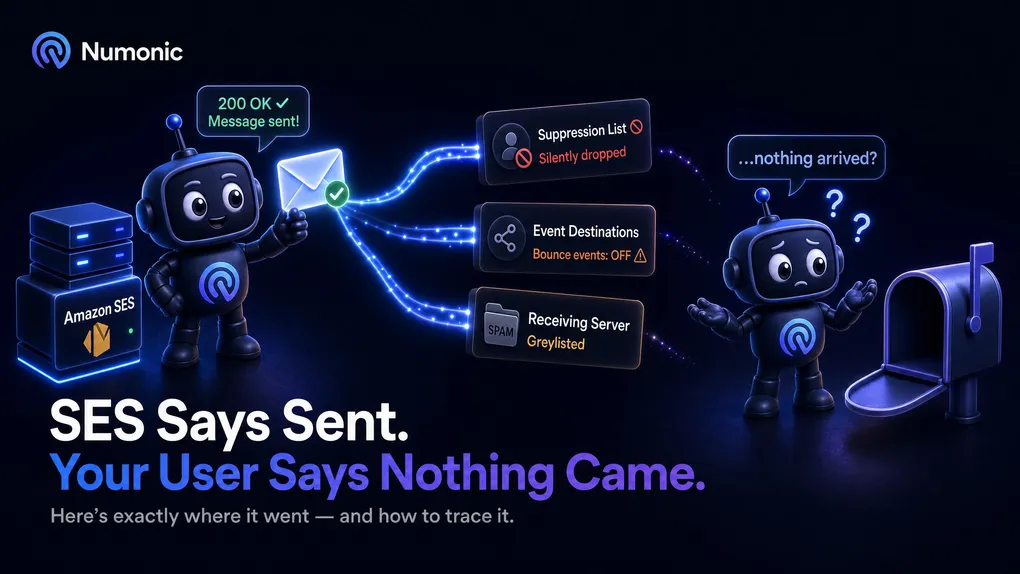
Amazon SES Says Email Sent But It Never Arrived: Where It Actually Went
 By Brian Havelka · · 5 min read
 Your code called SES. You got back a 200 and a message ID.
SES says the email was sent.
Your user says nothing arrived.
Both are telling the truth — and the gap between them is where most SES debugging goes wrong.
Here’s what “sent” actually means, the three places a message silently disappears, and how to trace exactly where yours went.
First: “Sent” Only Means Amazon Accepted It
When the SES API returns a 200 — or a 250 Ok if you send over SMTP — along with a message ID, it’s telling you one thing:
Amazon accepted the message for delivery.
It is not telling you:
The message reached the inbox.
Delivery happens after that handoff. And SES won’t tell you about failures at all unless you’ve set up event publishing through a configuration set.
So a success response is not proof of delivery. It’s proof of acceptance. Everything that matters happens next — and by default, quietly.
Where the Message Actually Went
There are three places a “sent” message disappears. Check them in this order.
Check 1: The Suppression List
If the recipient’s address ever bounced — even months ago, on a completely different send — SES may have added it to your account-level suppression list.
Once an address is suppressed, SES silently drops every message you send to it.
No error. No bounce. No event. The API still returns a 200 and a message ID.
How to check it
Open the SES console → Suppression list, or call ListSuppressedDestinations.
If the address is there, that’s your answer. You can remove it — but understand why it bounced before you send again, or you’ll just suppress it a second time.
Check 2: Your Event Destinations
This is the one that catches everyone.
SES only tells you what happened to a message if bounce and delivery events are being published somewhere. If they aren’t, failures are invisible by design — not broken, just never turned on.
How to check it
Open your configuration set → Event destinations.
Confirm two things:
- Delivery, Bounce, and Complaint events are being published (to SNS, or wherever you consume them).
- The destination is actually enabled. One that exists but is switched off tells you nothing.
Then confirm your sends are actually using that configuration set. If the config set isn’t attached to the send, no events are published — no matter how it’s configured.
You can’t debug what you can’t see. Fix this before anything else.
Check 3: The Receiving Side
If the address isn’t suppressed and your events are publishing, the message left Amazon. Now it’s on the receiver — and two things happen here that look like failure but aren’t errors.
- Greylisting. The receiving server temporarily defers the message and asks the sender to try again later. This can delay mail by minutes or hours. SES retries automatically; the message just hasn’t arrived yet.
- Silent filtering. Some providers accept a message — return their own success — and then route it to spam, or drop it, without ever bouncing.
How to check it
Check the spam folder first. A “missing” email is very often a delivered email sitting in spam.
If you can, send a test to an address you control and watch where it lands. That’s the fastest way to tell “didn’t arrive” from “arrived in spam.”
Trace It Properly: Match the Message ID
The three checks tell you whether something went wrong. To know what happened to a specific message, you have to trace it — and most teams skip the one step that makes it possible.
- Log the message ID at send time. When SES accepts a message, it hands you a message ID. Store it in your database, next to the user you sent to.
- Match it against your events. When a delivery or bounce event comes back, it carries that same message ID.
- Join the two. Now “some address failed” becomes “the email to this user bounced, and here’s the reason.”
Without step 1, a bounce event is just an address and a code with no context — you can’t tell which of your sends it belongs to. With it, every event points back to a real message and a real person.
To test the whole loop safely, send to the SES mailbox simulator at bounce@simulator.amazonses.com. It produces a clean, real bounce event you can trace end to end.
Decode the Bounce Code
When a bounce does come back, it arrives with a diagnostic code like 550 5.1.1 — technically precise, and completely unhelpful if you don’t read them every day.
Paste the code into the free Numonic Bounce & SMTP Decoder. It tells you, in plain English, what the code means, what caused it, and what to do about it.
No account required.
The One Thing Nobody Tells You
Even SES’s Delivered event doesn’t mean what most people assume.
Delivered means the receiving mail server accepted the message.
It does not mean the message reached the inbox.
A message can be marked Delivered by SES and still land in spam, promotions, or a quarantine folder. The receiving server said yes; the inbox is a separate decision made afterward, and SES has no visibility into it.
That’s the ceiling of what SES events can tell you. To see actual inbox placement, you need signals from the receiving side — Gmail’s Postmaster Tools, DMARC reports — that live outside SES entirely.
The Pattern Underneath All of This
Every failure above is silent. The API returns success. No exception is thrown. Nothing errors.
That’s what makes “sent but never arrived” so hard: the failure never announces itself. It surfaces days later as a support ticket, a failed password reset, or a customer who quietly gave up.
The way out isn’t a better error message — SES won’t give you one. It’s visibility: capturing and watching the events SES does publish, so you find the problem before a customer is the one who tells you.
Start with the events you already have. When a code comes back you don’t recognize, decode it.
No account required.